Updating a ROM Hack Without Losing 48 Hours of Pokémon
I have been playing Pokémon Recharged Yellow on my Miyoo Mini+ for a while. How long, I only found out halfway through this post: the save screen says 48 hours. Then I noticed the hack had a new release, 1.9.7, with a long list of bug fixes, and I wanted it without starting over.

It worked, but not on the first try. The first try froze the game so hard that the menu button did nothing and I had to hold the power button to turn the console off. The rule I came away with is short, so here it is up front:
Carry the in-game save, the .srm, to the new version. Leave the save states behind.
The rest of this post is why, and the steps.
Two kinds of save
An emulator gives you two ways to save, and they look the same from the menu.
The in-game save is the one the game itself makes: in Pokémon you open the menu and pick Save. On the original cartridge that went to a small battery-backed memory chip. An emulator writes the same data to a file named after the ROM, ending in .srm. It is the game’s own data, in the game’s own format.
A save state is the emulator taking a photo of the whole console at that instant: memory, CPU, everything. RetroArch writes them as .state, .state1, .state2 and so on, one per slot, plus .state.auto, the one it makes on its own when you quit. On OnionOS that automatic one is also what resumes when you open the game again, which is why it feels like the game never closed.
That photo is the problem. It is a snapshot of the old version of the game sitting in memory. Load it into a new version, where the code has moved around, and you are asking the new game to wake up inside the old one.
What I did first, and what happened
Each save file is matched to a game by its filename. The new ROM had a new name, Pokemon - Recharged Yellow (1.9.7).gba, so I copied every save file across with the new name: the .srm, the .state.auto, and all twenty numbered state files.
I opened the new version and got a white screen. I waited, and after a while it loaded right where I had left off, which looked like success. Then I pressed a button and nothing happened. No movement, no menu, nothing. The menu button that normally opens RetroArch’s menu did nothing either. The picture was there, but the game behind it was frozen.
The only way out was holding the power button until it turned off. On the way down, the console did what it always does at shutdown: it wrote a new .state.auto, of the frozen game, and a new .srm from it, both under the new version’s name. So the next launch would have resumed into the same freeze.
What saved me was that none of this touched the old version’s files. Copies, not moves. The old game, under its old name, still had its saves exactly as I had left them.
The way that works
This is the order I would do it in again. I have only tried it on GBA, with mGBA on OnionOS, but nothing in it is specific to that setup.
- Save in the game, in the old version. Open the in-game menu and save, so the
.srmholds where you are. A save state does not update it. - Back up the save folder. All of it, onto your computer, before touching anything. Mine was 6 MB.
- Add the new version next to the old one, with a different filename. Never replace the old ROM. Putting the version in the name keeps them apart.
- Copy only the
.srmto the new name.Pokemon - Recharged Yellow.srmbecomesPokemon - Recharged Yellow (1.9.7).srm, in the same folder. No.statefiles, and if an earlier attempt left any under the new name, delete them first. The.srmis the game’s own data, so a new release of the same hack can usually read it, but check its changelog in case one says otherwise. - Open the new version. With no save state to resume, it starts from the intro. Get to the title screen and choose Continue.
- Save in the game straight away. Now the
.srmis written by the new version, and from here on save states work normally, because they are photos of the new one.
When I did it this way it loaded straight into my file, team and 48 hours intact. Only once the new version had saved on its own did I delete the old one.
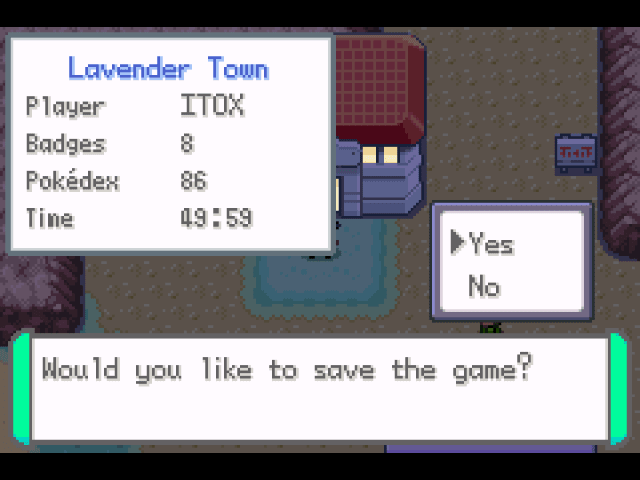
That is the new version a few sessions later, with the clock still counting from where the old one stopped.
Where the files live, for the two systems I use:
| In-game save | Save states | |
|---|---|---|
| OnionOS (Miyoo) | Saves/CurrentProfile/saves/<core>/ | Saves/CurrentProfile/states/<core>/ |
| muOS (Anbernic) | MUOS/save/file/<core>/ | MUOS/save/state/<core>/ |
<core> is the emulator, mGBA or gpSP for GBA. Check which one has the newest files. I had saves under both, and the gpSP ones were eight months older than the mGBA ones.
One OnionOS detail: it reads its game list from a cache, so a ROM copied in from a computer does not show up until you run Refresh roms from that list’s menu.
One more thing before you get creative: Pokémon has one save slot per game, so New Game plus a save overwrites your file. A second playthrough needs a second copy of the ROM under another name, which gets its own .srm.
Recharged Yellow is made by Jaizu, and the patch comes from Jaizu’s Ko-fi. If you play it, it is worth supporting. Fifty hours in, I am still not done.
This is part of a series about retro handhelds. Earlier posts covered installing Guacamelee! on the Anbernic and a first look at RomM.